

__________________________________________________________________
15th June 2026 Update
🔁 Recurring Events are here!
No more creating the same event over and over! Set up your series once and let the magic happen. Find out how it works here.
__________________________________________________________________
9th May 2026 Update
🎯 Introducing Weekly Streaks!
Check out this cool new feature that helps you to build your English habit - one week at a time!
__________________________________________________________________
21st March 2025 Update
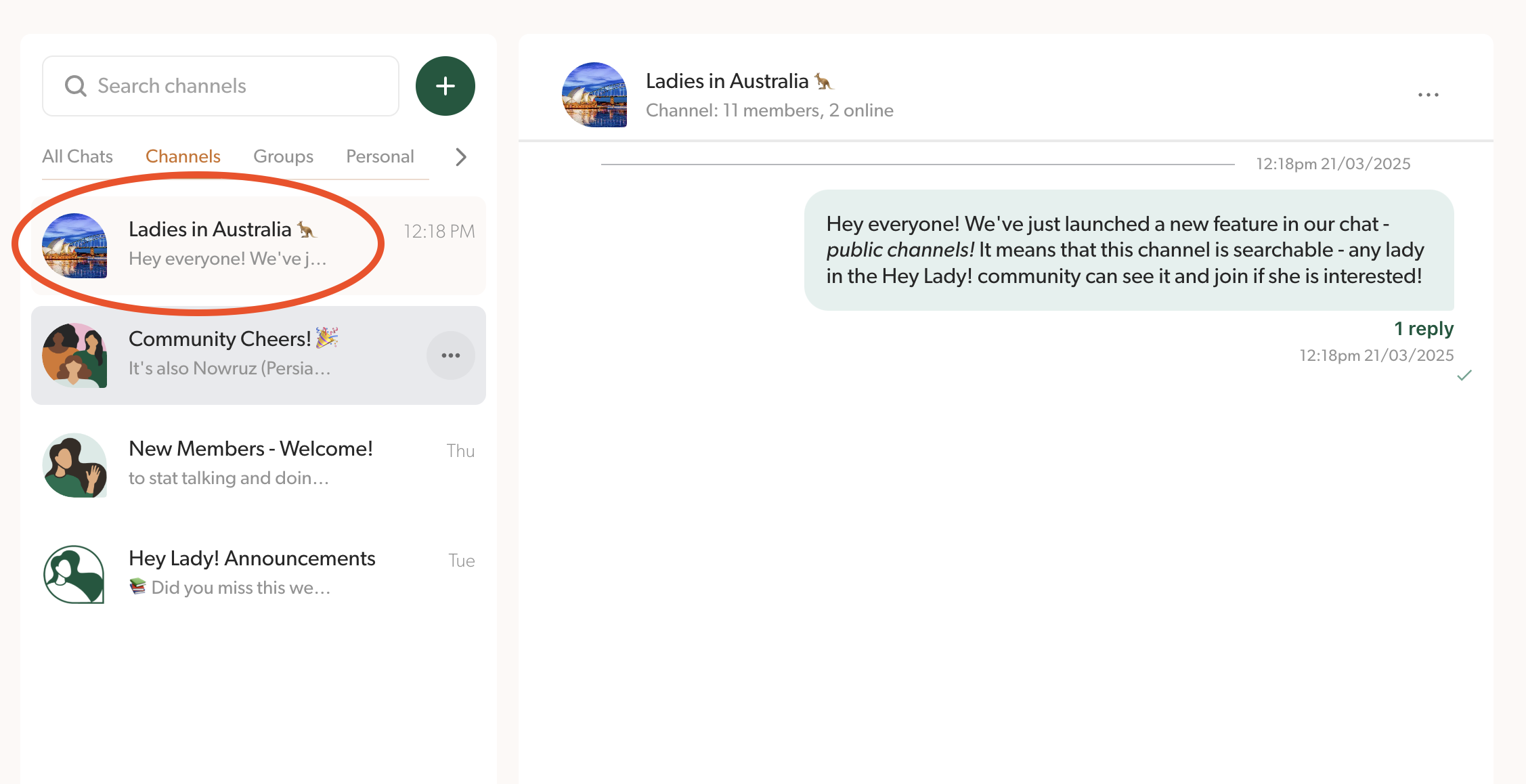
📢 Introducing Public Channels!
This new feature is inside the Chat section - now you can create a public channel that is searchable and any lady in the community can see and join!
__________________________________________________________________
24th February 2025 Update
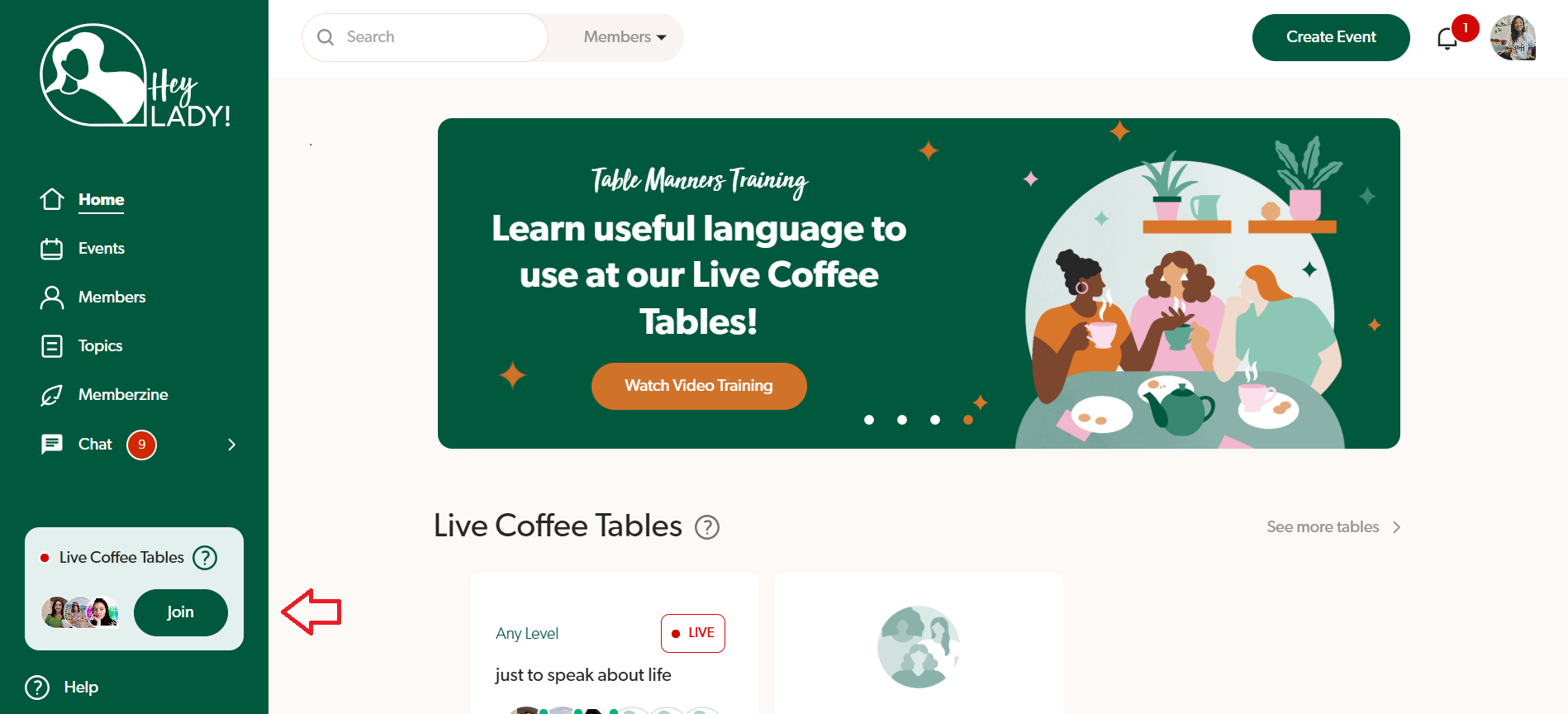
It's even easier to join Live Tables now ☕
There is now a static widget visible in the sidebar menu that shows if a live table is happening (if not, you can easily start one!) Clicking the "Join" button will take you to the Live Tables page where you can see more details about the table and join, or start your own.
__________________________________________________________________
4th February 2025 Update
Introducing Chat Threads! 💬
Find out more here so you don't miss any important discussions or message threads that you're part of!
__________________________________________________________________
15th January 2025 Update
New Chat features 🤩
Find both of these new features by clicking the 3 dots next to the chat!
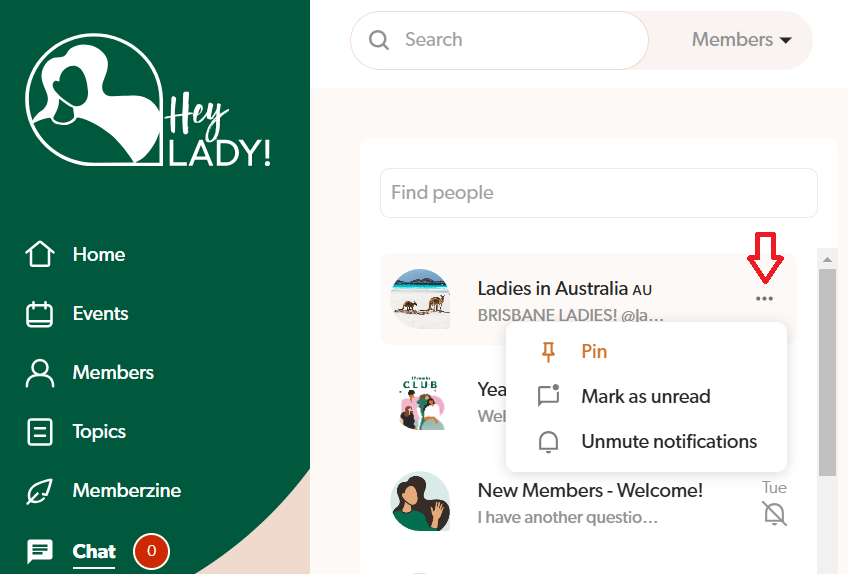
📌 Pin/Unpin: Now you can pin a chat which lets you keep specific chats at the top of your list to find them quickly!
📩 Mark Unread: Mark a chat or message as unread to help remind you to go back to it at a later stage (perhaps when you need more time or information to respond!)
__________________________________________________________________
12th December 2024 Update
💫 NEW Speaking Level Assessment!
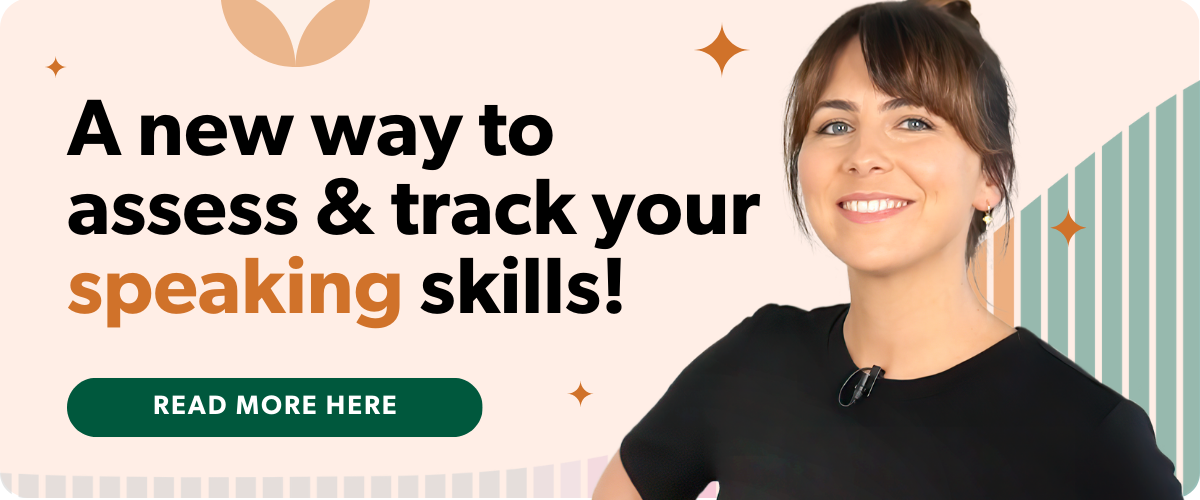
We have partnered with an AI language company to build our own, custom Speaking Assessment meaning you can now test your current Speaking Level from right inside our platform - in as little as 15 minutes!
And unlike most online Level Tests, this tool assesses your English fluency skills through a series of recorded, spoken answers. Yes, you will actually speak, not just type!
This Speaking Assessment is a chance to:
Find out your current Speaking Level
Find out what you need to work on to improve
Get personalised recommendations
Track your progress over time.
👉 Click here to find out more about how English levels work at Hey Lady!
👉 Click here to find out how to take the assessment!
__________________________________________________________________
2nd December 2024 Update
📈 NEW Event Summary on your profile
On your profile, you can now find a clearer summary of your participation inside Hey Lady! including the type of events joined and hosted, participation time and number of articles written! You'll also be able to check your Monthly Recap - a presentation that will help you review your progress and reflect on your achievements in the previous month! 💪
You can learn more about your viewing your Events Summary and participation statistics here.
__________________________________________________________________
11th November 2024 Update
Update to our Hey Lady! Referral Program
Now, when you invite a friend to join Hey Lady! using your unique referral link...
Your friend will get a 7-day FREE trial (credit card needed); and
$20 USD credit will be added to HER Hey Lady! account - which means she can reduce her first membership payment by $20 USD. And you will have a much higher chance of success!
How do these updates benefit you?
4X FASTER to start earning rewards - because you only have to wait 7 days to see if your friend stays instead of 30 days!
5X EASIER to earn EPIC rewards - because your friends are 5X more likely to stay beyond their free trial with these changes. (And for every friend that continues after her trial by paying for her membership, you become eligible to earn rewards - including return flights to a Hey Lady! meetup!)

Refer a friend and win 6 x Private Pronunciation Sessions with a Coach! (That’s on top of the usual referral rewards 😍)
How to enter & win the competition:
Start inviting your friends, family & colleagues to join Hey Lady! today
Follow the “3 Tips” below to help your friend sign up & stay after her trial
The member with the highest number of successful referrals made between 11th November and 31st December 2024 will WIN 6 x private (one-to-one) pronunciation sessions with a Hey Lady! Coach
We will announce the winner in the January 2025 edition of The Loop!
__________________________________________________________________
22nd August 2024 Update
📆 Recommended Events
Have you noticed our Events page has had a bit of a makeover? Now, you will see a Recommended section where we make suggestions on what events we think you'll enjoy! You can watch a video here where Emma explains more about how we make these personalised recommendations!
__________________________________________________________________
26th July 2024 Update
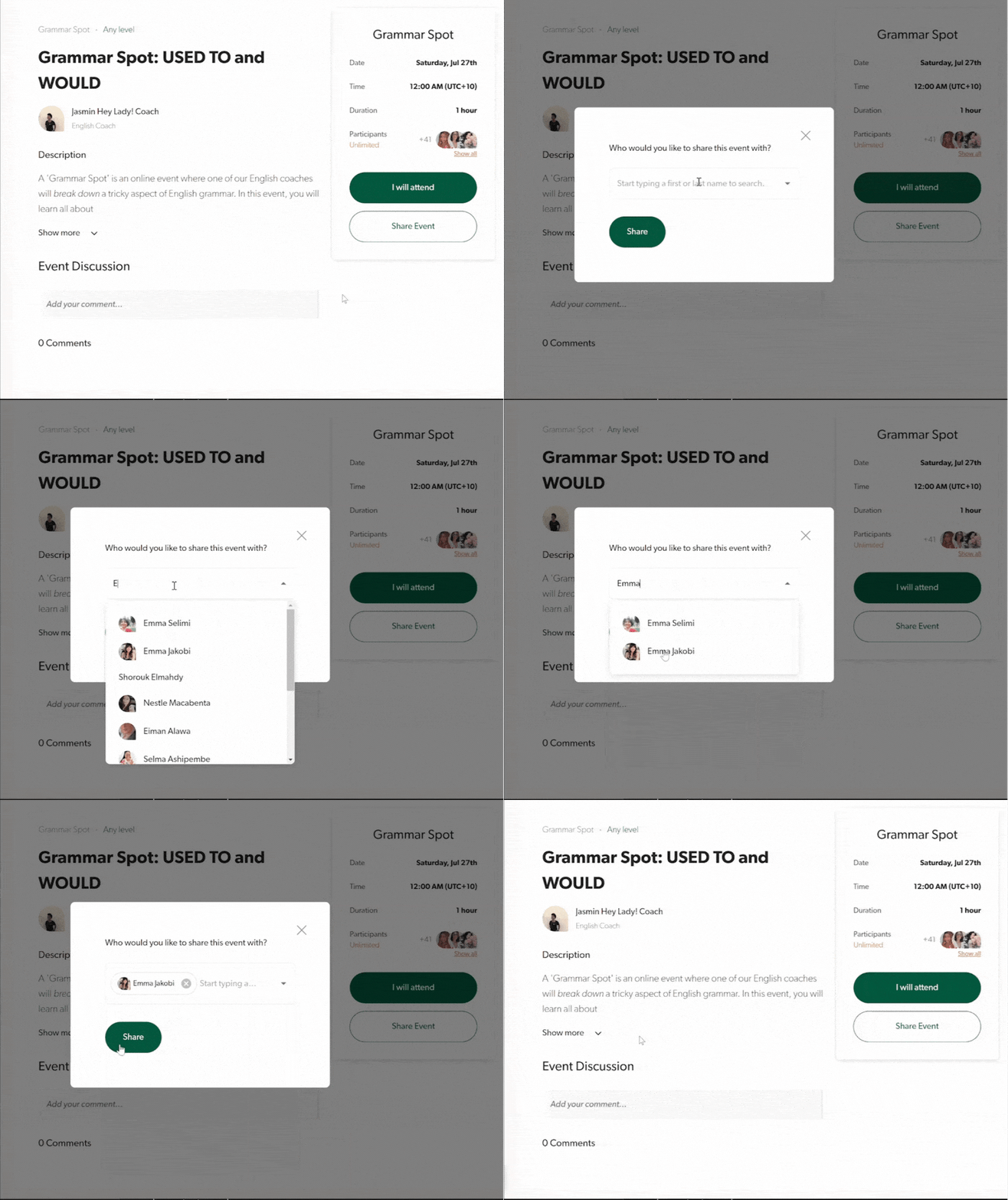
🖱️ SHARING an event is even easier now!
Is there an event that you want to share with another member? Now you can easily do it from the event itself 🙌
Just click 'Share Event', search for their name(s) and click 'Share'. This will then send the invitee a notification on the platform and by email!
__________________________________________________________________
15th July 2024 Update
🔎 Use the SEARCH bar to find Memberzine articles
You can now use the SEARCH bar at the top of our platform to find Memberzine articles! 🥳
You can search for articles by author OR topic, depending what you’re looking for!
Just choose the ‘Memberzine’ option from the drop down menu, then start typing to find articles that interest YOU!
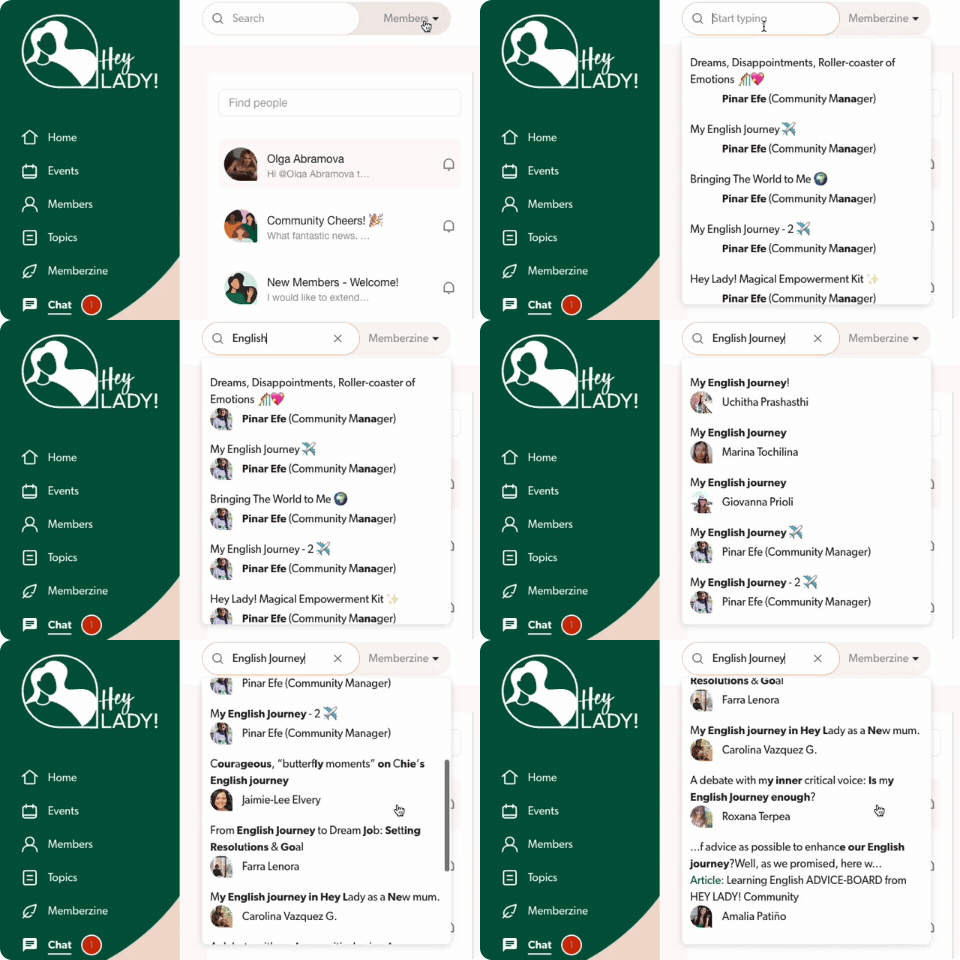
Please note: This is Part 1 of a bigger feature release, which will eventually include the ability to SEARCH for specific events, topics & resources.
__________________________________________________________________
15th July 2024 Update
🎙️ Send AUDIO messages via the Hey Lady! chat box
Get some extra speaking practice in with the NEW audio messaging feature in the Hey Lady! chat box!
It’s fun, it’s easy, and it’s a GREAT way to build your confidence and feel more comfortable speaking English with other people!
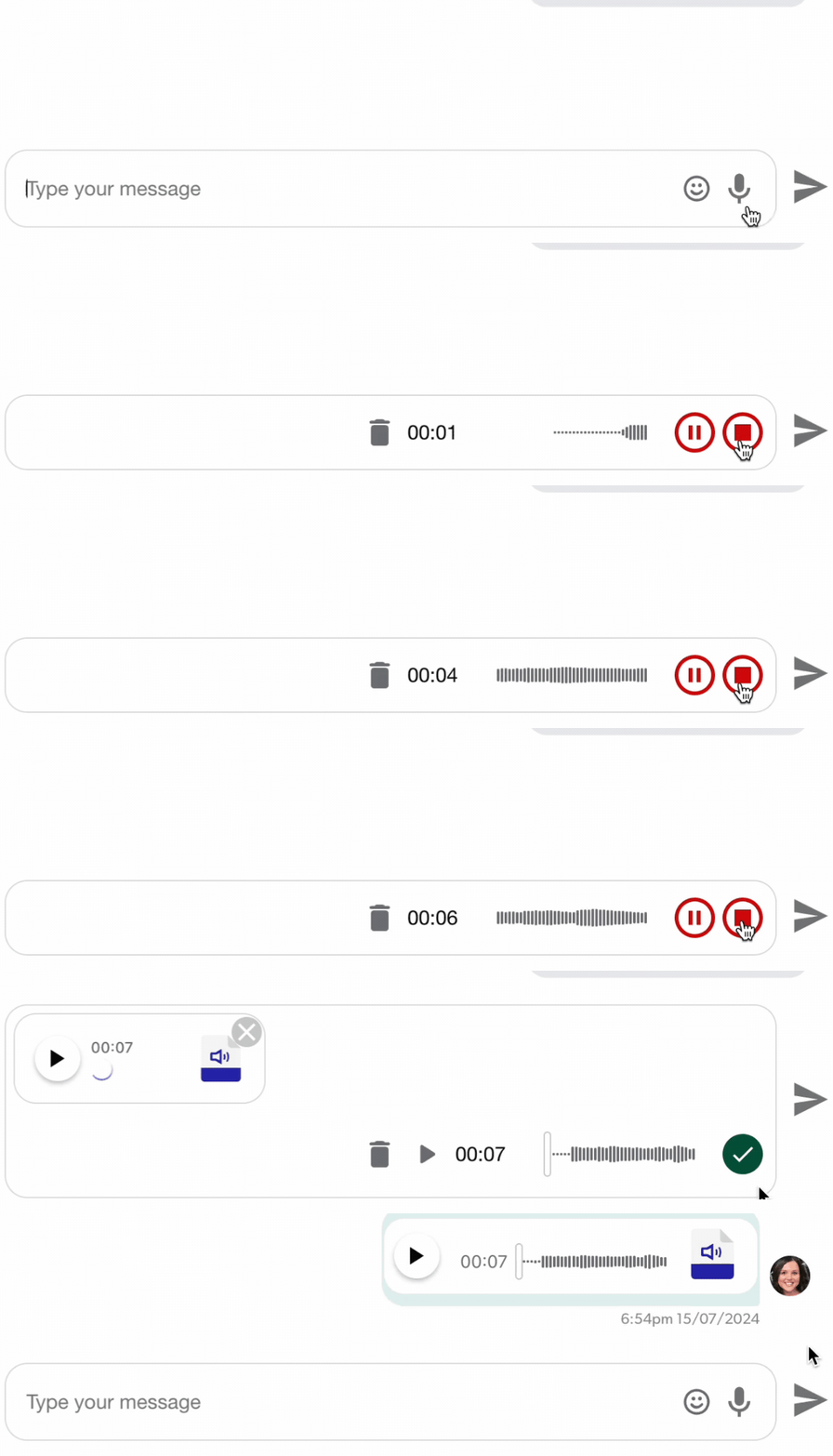
For step-by-step instructions, check out this article created by our Customer Support Team.
__________________________________________________________________
15th July 2024 Update
📍 Introducing the new ‘In-Person Event’ category!
Now you can easily create and find meetups in your city with the new ‘In-Person Event’ category!
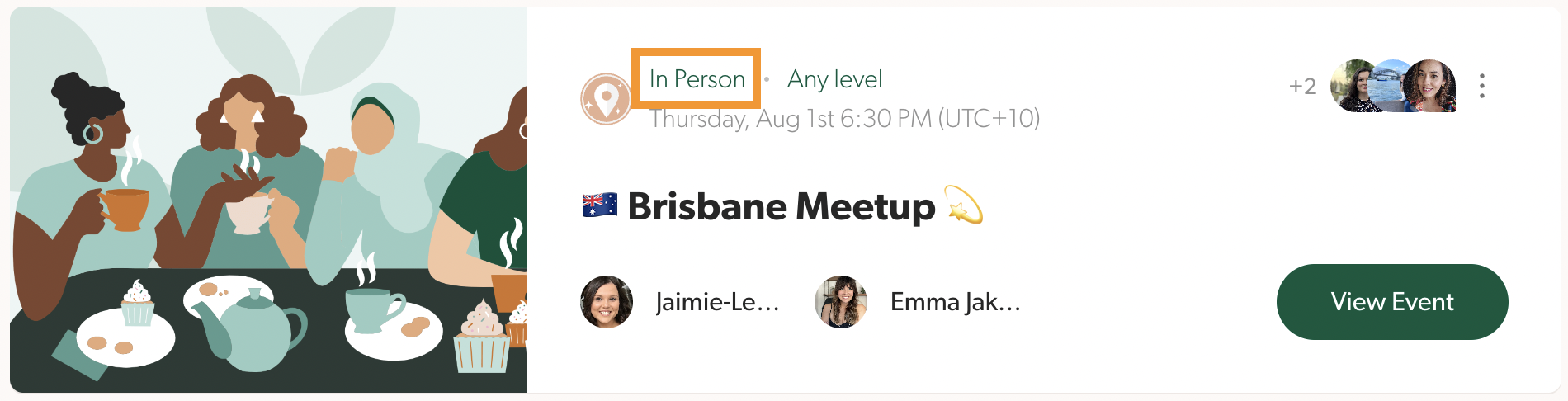
If you’re creating/planning an in-person meetup…
Just choose the “In-Person” option at Step 1 of the Event Creation process.

You can even add the exact meetup location, which will include a map on the Event Page to make it easy for your attendees!
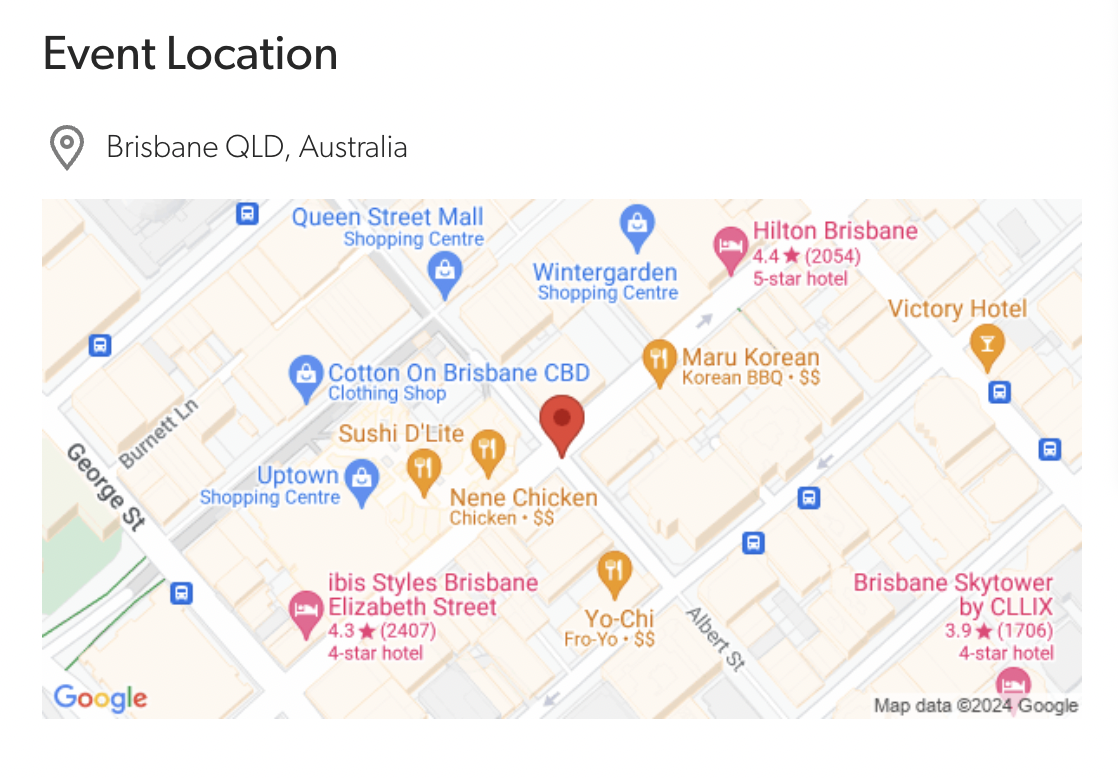
(Not sure of the exact meetup location yet? Just enter the name of your city!)
If you’re looking for an in-person meetup…
Just choose the new “In Person” category from the “Event Types” filter!
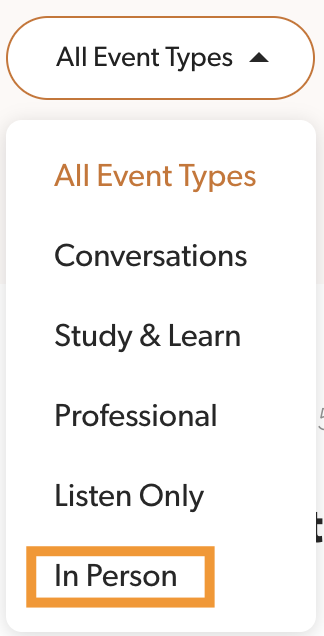
And if there’s no meetups happening near you… Maybe it’s time to plan your own! 😍
(We have a handy guide here to help you!)
__________________________________________________________________
24th June 2024 Update
We’ve given our Hey Lady! Referral Program a major upgrade! 💃🤩
Now, when you invite a friend to join Hey Lady!...
Your friend will get a 30-day FREE trial (no credit card needed); and
You will earn epic rewards, including special badges, Hey Lady! credit, free membership and even return flights to a Hey Lady! meetup! ✈️
__________________________________________________________________
20th March 2024 Update
Now you can DUPLICATE Events!
Need to host a regular event? We've made it easy to duplicate an event in just one click!
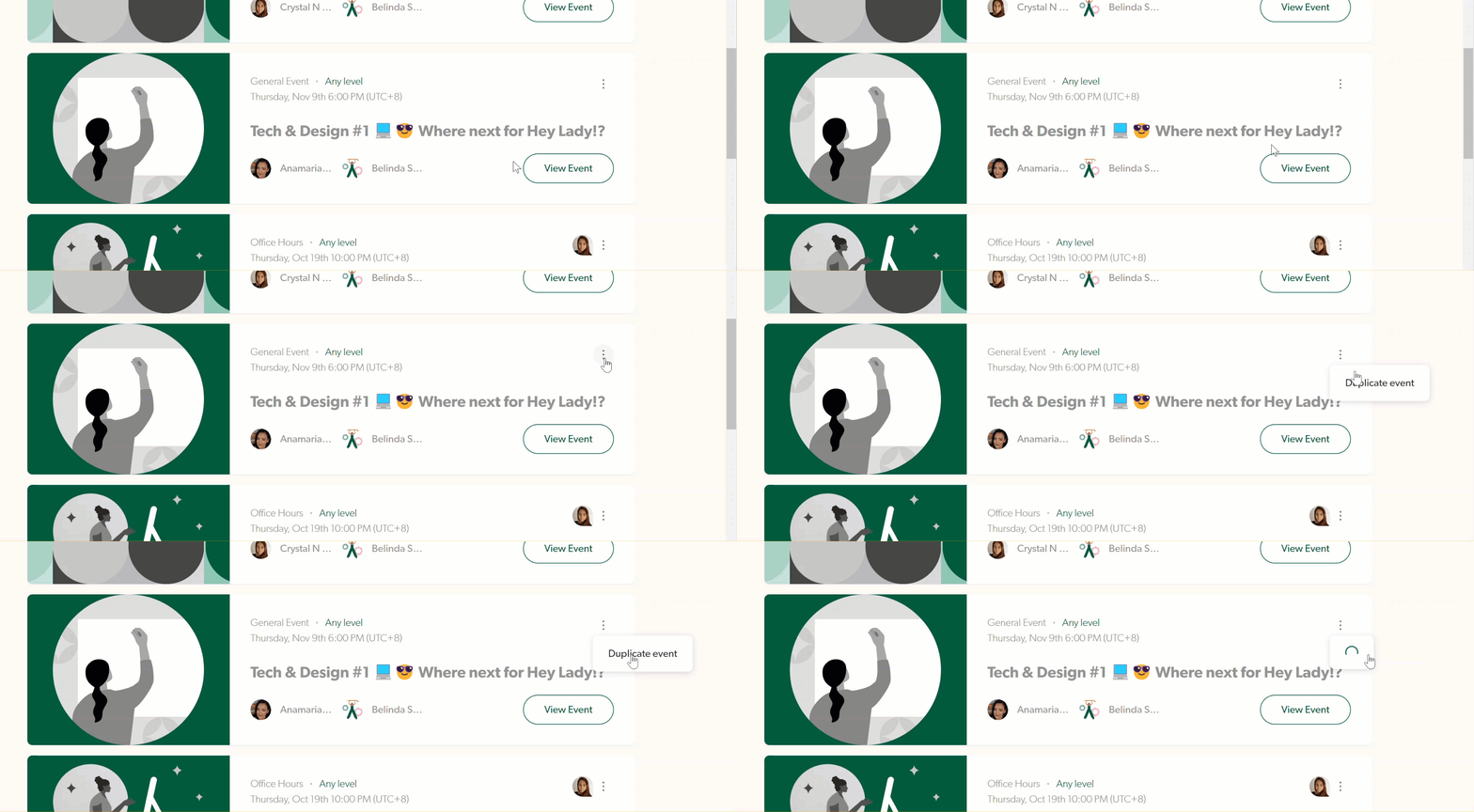
In the platform, find the list of Events you are hosting (or have hosted) by going to the Events Page or your Profile Page.
Look for the '3 dot' menu, then select Duplicate Event.
Note: We will duplicate everything in your event except the date and time.
We will also duplicate all the ladies you invited to your event so please check the participant list carefully to ensure the right people are being included or removed.
__________________________________________________________________
20th March 2024 Update
🗓️ New Event Filters
We have made it easier to find the events you are looking for with 2 new filters just added.
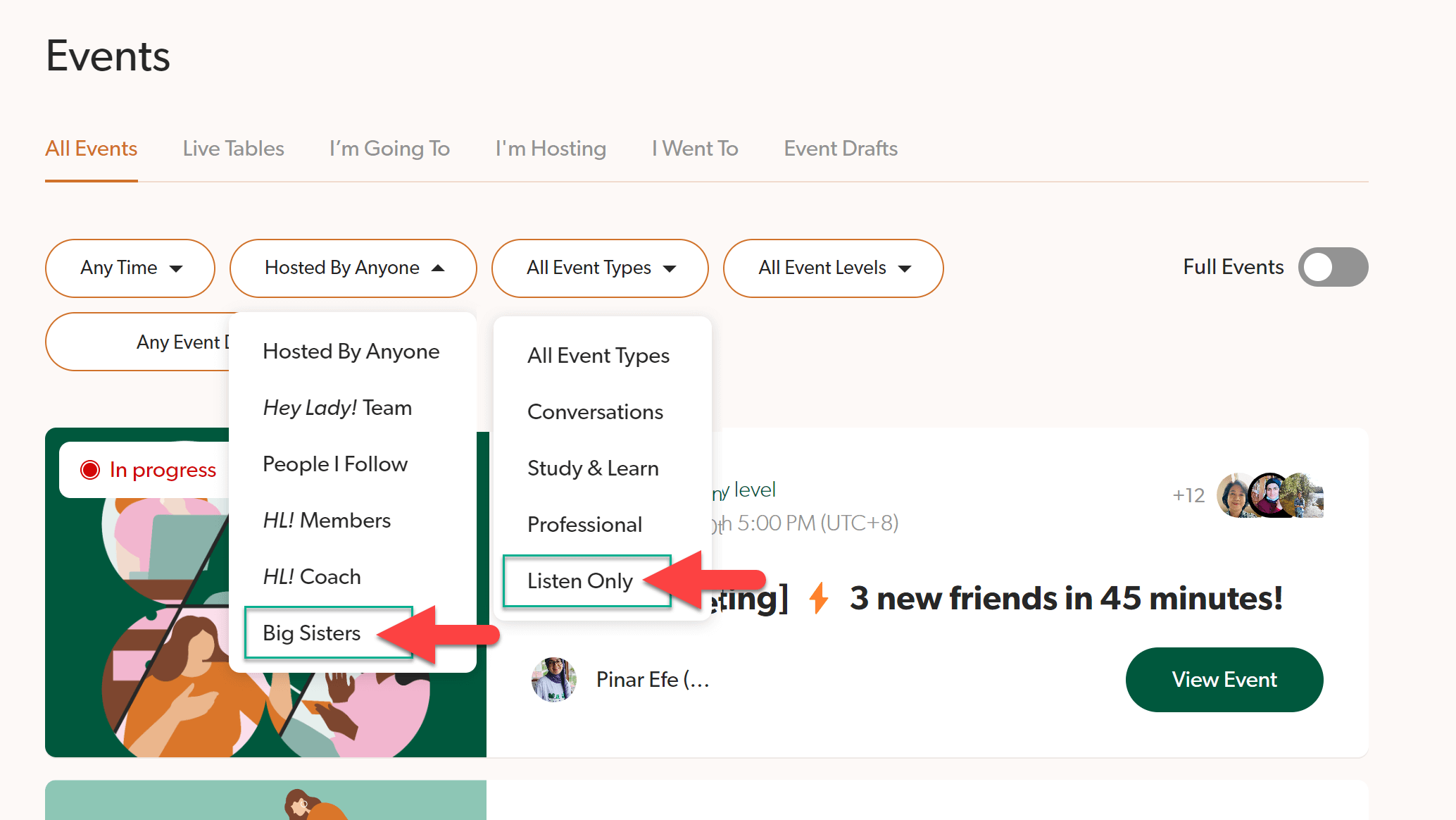
Events hosted by Big Sisters
Our wonderful team of volunteers, your Big Sisters, regularly host events in the community to help you meet new friends, explore new ideas or learn to use the platform.
You can now find events hosted by Big Sisters just by using the filters.
Listening Events
Have time to learn something new but not in a good place to use your webcam? Tune into our Listening Events from wherever you are!
You can now find listening events using the "Event Type" filter.
__________________________________________________________________
20th March 2024 Update
If you haven't noticed already, we have just released a major feature that allows you to practise English anytime with other ladies who are online.
This is another opportunity for you to get some extra practice in a casual setting over coffee! There's no pressure to prepare or obligation to stay, you can grab a seat at a table and meet new people.
No one there? Try it! You can easily start your own table and wait to be joined by someone else.
Click here to watch a video with all the details!
✨ Better AUDIO QUALITY in Hey Lady! Video calls!
Hey Lady! Video has been updated to include better audio quality by reducing mic noise!
❌ No more echo-ing mics
❌ No more noisy background noises
❌ No thumps or bumps!
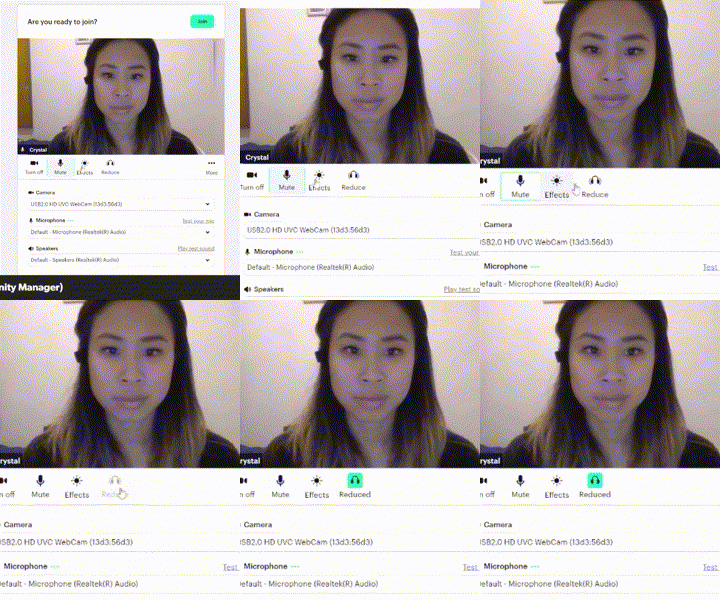
To enable better audio quality, look for the “Reduce Noise” (headset icon) in the waiting room before you join the call. If you forget to do this before you join, you can turn it on via the Mic Settings inside the call.
💬 Instant Chat notifications!
Get notified when someone who is online when you are, sends you a message through the Chat.
When enabled, you’ll hear a sound and see a popup message!
You can also disable this feature by muting the channels that you don’t want to receive instant notifications from.
To get set up, follow these steps created by our Customer Support Team.
__________________________________________________________________
13th May 2023 Update
📲 Instant video calls are here at last!
That’s right ladies! Now you can practise speaking English any time with other members who are online when you are!
Instant videos are available through the Chat.
Simply click the ‘Start Video’ icon at the top right corner of any chat channel to begin the call.
A message with a link will be posted into the chat to show that a video call has started.
While your call is in progress, the icon will change to a red ‘Join Video’ icon for others to click and join you.

Customise your Group Chat name and image!
Want to have a special image for your Group’s chat channel? We’ve updated the Chat management settings so you can do this in just a few clicks!
You can also change the name to make your Group Chat easier to find.
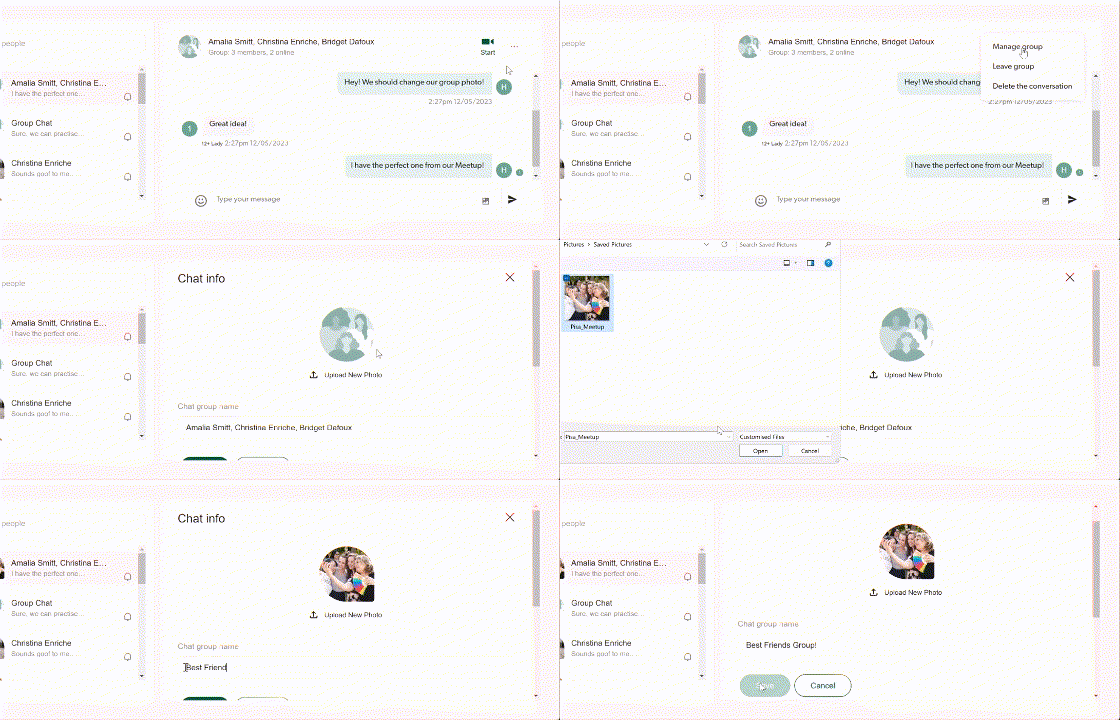
Just click the three dots at the top right of your screen then, ‘Manage Group’.
Next to your Group Image you will see an ‘Edit’ icon. Click this to customise your image and Group name.
👭 Share Hey Lady! with a friend and you’ll both receive $10!
Did you know you can earn credit on your Hey Lady! account?
Help us to share Hey Lady! with the world and enjoy the benefits!
Whenever you refer someone else to join our community, we’ll give them $10 off any Membership Plan! When they become a paying member, you’ll get $10 credit toward your next membership payment.
This article explains how it works, including answers to Frequently Asked Questions (FAQs).
__________________________________________________________________
30th December 2022 Update
This update is ALL about our video calls. 🎥
Any events you have created, or will create in future will no longer be hosted on Zoom, they will be hosted within the Hey Lady! Platform. (This means, you will not be taken to the Zoom app for your call)
The experience of joining a video call will look a little different, but essentially, it’s all the same (in fact, we think some things are even better!) 🎉
If you have recently met with another member in the community in a one-to-one video call, you have already experienced Hey Lady! Video! 🤠 If you’ve only joined group events recently, this update is an important one for you to read.
What you need to know about Hey Lady! Video
Hey Lady! Video performs best using the Google Chrome browser.
If you don’t use Google Chrome, you won’t experience all the video features (eg: virtual backgrounds) Other web browsers you may use are Safari, Firefox, Internet Explorer, Microsoft Edge.
We recommend installing and using Google Chrome as your web browser when you use Hey Lady! [Instructions to install Google Chrome]
Breakout rooms are not supported… Yet!
(But we are working on this feature right now!)
If you don’t use breakout rooms in events that you host, this won’t be a big deal.
In fact, we’ll be releasing a beta* version of our group video calls with breakout rooms in the next few weeks! You’ll be able to try this feature out and give us feedback as we finalise this feature.
*(to) beta test means that we are still developing the product, but it’s available to try and offer feedback to the Hey Lady! team)
While breakout rooms are unavailable on Hey Lady! Video, most events hosted by the HL! Team will still be hosted in Zoom.
If you need to use breakout rooms in an event you are planning, please email us here so we can help you set it up!
The way you share your screen is different.
If you want to screen share, make sure you have Hey Lady! open in Google Chrome.
Do not share your entire screen. 🚫
Share a window ✅ or a tab ✅
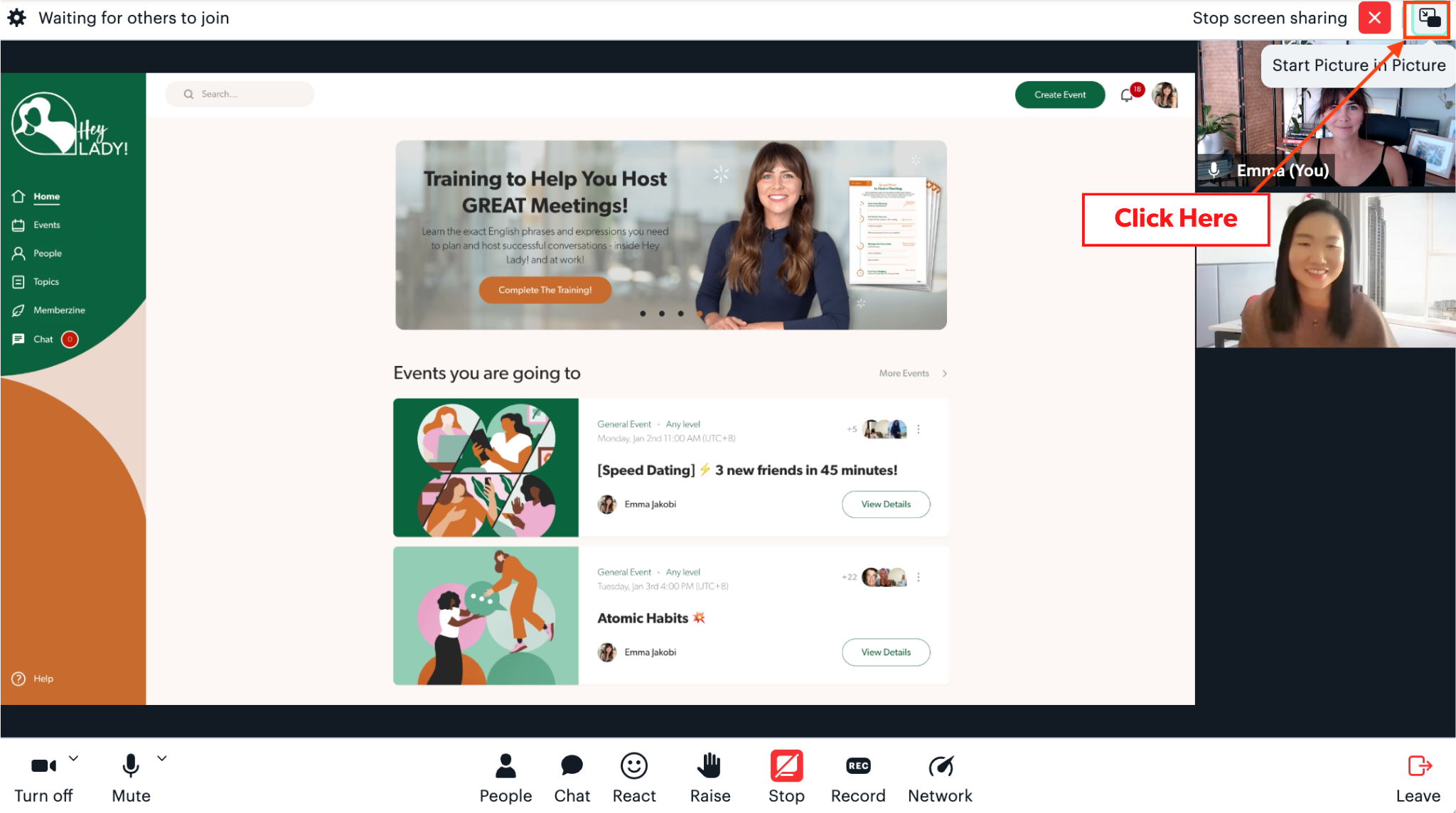
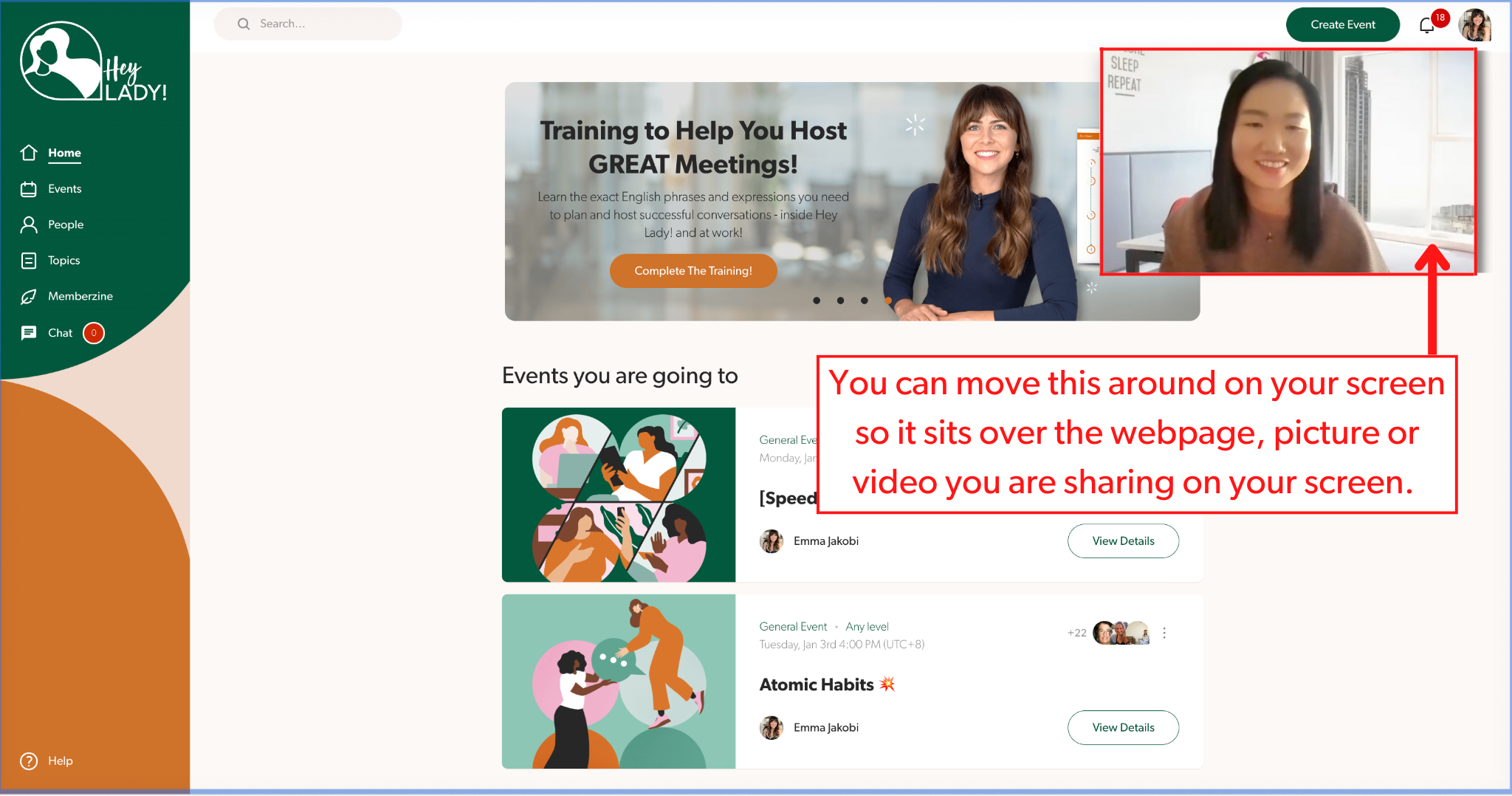
You can use ‘picture-in-picture’ to put the video of participants over the webpage you are sharing on screen by clicking here:
There are some fun new features to try! 🥳
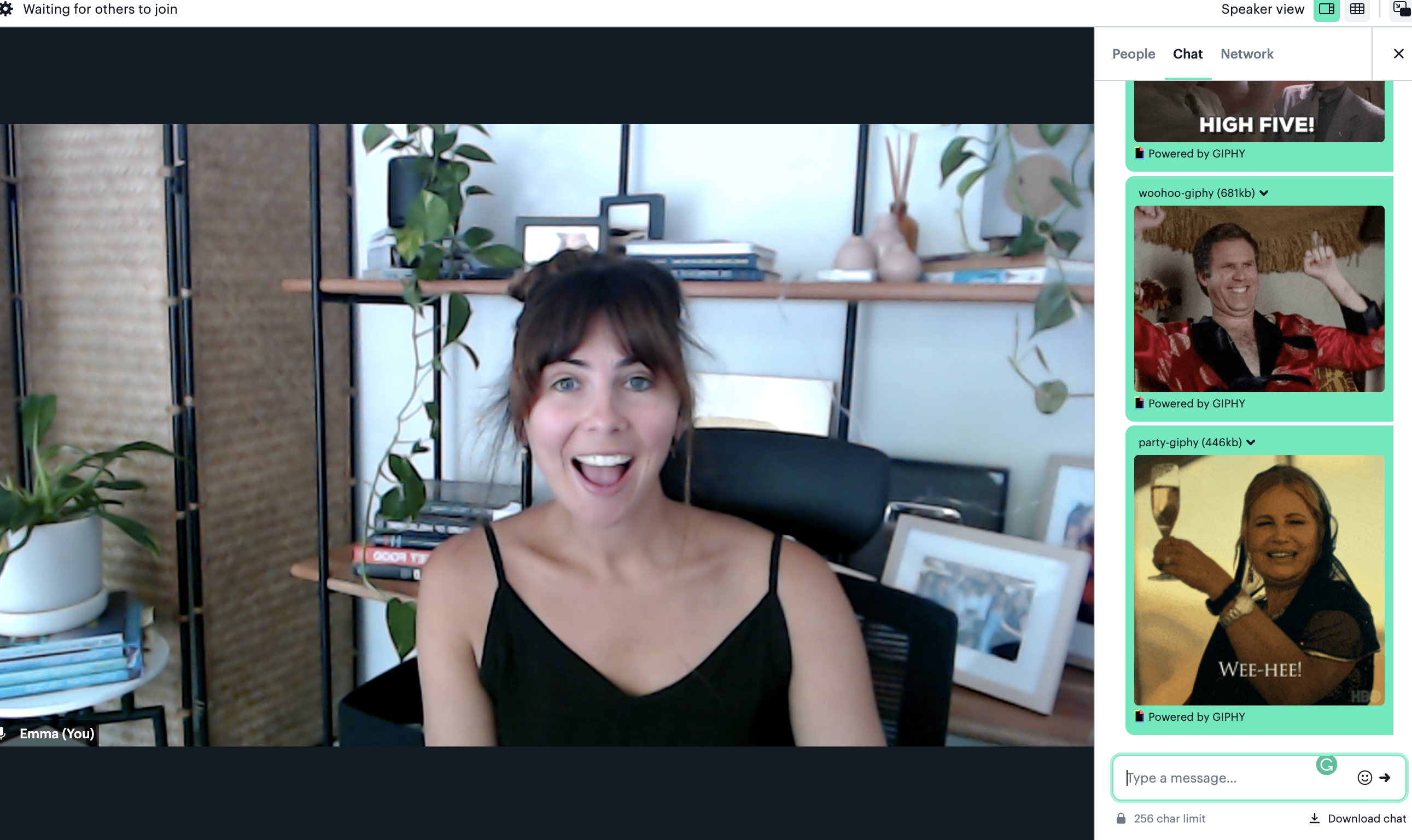
Try sharing gifs in the video chat by typing /giphy and then the keywords you want to use to search gifs. For example:
/giphy yay
and then hit <enter> and it will bring up the results with a shuffle button.
We want to hear about your group call experience!
Let us know what you love, and what’s not working as you expect. Click here to share your feedback!
Our team is building the Hey Lady! platform specifically for our community - it’s completely unique! Our aim is to give you the tools, resources and ideas to be creative, feel inspired and motivated to study, practise and develop your English speaking skills and the confidence to use your voice with ease and purpose.
Thank you for your support (and especially your feedback) as we grow and create the Hey Lady! experience for you 💖
__________________________________________________________________
25th November 2022 Update
We’ve been busy working on 4 new platform features that will help you:
Create & find events that are important to you!
Automatically add events to your Google Calendar
Easily find members who have similar interests, level & availability
Explore member profiles & get to know each other better!
In this short video, Emma will talk about these exciting features (& how to use them), so you can go and explore them yourself!
If you have any feedback or requests for features you would like to see at Hey Lady!, we would love to hear from you! Just reach out to our team through the Help section on our platform, or email us at hello@heylady.io